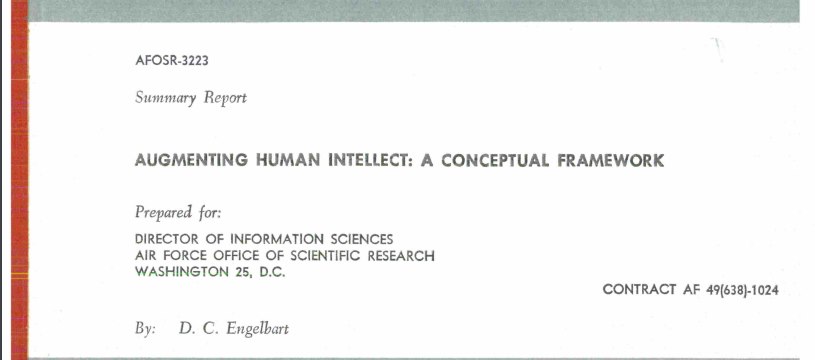
In his 1962 paper "Augmenting Human Intellect: A Conceptual Framework," Doug Engelbart introduced the concept of augmentation. He envisioned a future where everyone would have a personal assistant that possesses infinite patience and knowledge about the individual. This assistant would support and empower individuals in every possible way, aiming for their success. Whether it's addressing confusion, learning new things, understanding difficult concepts, or navigating through various situations like a job review, this assistant would provide guidance and tools to help accomplish tasks. Engelbart believed that such augmentation would significantly increase the chances of achieving success in all aspects of life. It only took 63 years, but he was right.
Modernizing Valuation: Integrating Artificial Intelligence into the Property Tax Assessment Lifecycle
Tailored for New Jersey Tax Assessors, County Tax Boards, and Revaluation/Compliance Teams. Last updated: September 19, 2025
Craft clearer correspondence, summarize complex statutes in seconds, and surface overlooked insights in your data. Explore how AI is transforming the assessor’s office—from discovery and data integrity to valuation analysis, notice generation, and appeal defense. This session is hands-on and practical: we’ll use AI to streamline communications with taxpayers and attorneys, analyze income & expense (I&E) statements for commercial appeals, summarize regulations (e.g., PILOTs, Chapter 91, Farmland Assessment, Freeze Act), and accelerate desktop review and field inspection workflows. We’ll also demonstrate how to safely integrate AI into existing CAMA, GIS, and document systems while meeting OPRA and records retention obligations.
1) What is AI Today?
Artificial intelligence (AI) refers to systems that perform tasks requiring human-like judgment—pattern recognition, prediction, and language. Most modern AI relies on
machine learning and, increasingly, large language models (LLMs) that generate text, tables, code, and summaries. For the public sector, the NIST
AI Risk Management Framework (AI RMF 1.0) is the go‑to reference for
governance and controls (Govern → Map → Measure → Manage), offering a practical backbone to manage model risk, documentation, and oversight.
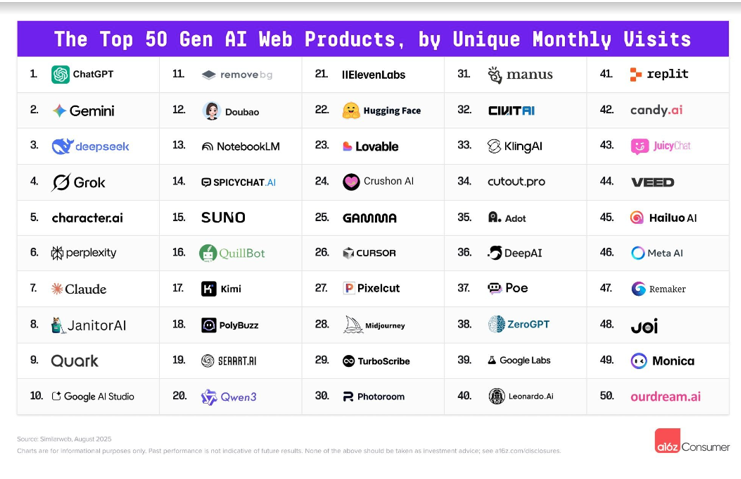
Platform landscape (what differentiates them):
OpenAI (ChatGPT Enterprise/Teams/API) emphasizes enterprise privacy (no training on your org data by default; SOC 2 Type II). See
Enterprise Privacy and
ChatGPT Enterprise.
Grok (xAI) offers versatile AI assistance with higher usage quotas for SuperGrok subscribers and API access for developers. Available on grok.com, x.com, and mobile apps. See
Grok and
xAI API.
Google Gemini (Public Sector) offers Workspace + Gemini capabilities and, as of Aug 2025, a “Gemini for Government” OneGov offering:
Google Public Sector blog.
Anthropic Claude is known for long-context reasoning and safety (Constitutional AI) and is available with FedRAMP High/DoD IL4/5 via AWS GovCloud (Bedrock):
AWS announcement.
Microsoft Copilot is integrated into Word/Excel/Outlook/Teams and available in government clouds (GCC; GCC High targeted for GA in 2025). See
Copilot for GCC and the
service description.
2) Emerging Trends & What’s Coming (1–3 Years)
Expect rapid adoption of multimodal copilots (text + tables + charts + PDFs), agentic workflows that chain steps (e.g., “pull GL, detect anomalies, draft variance memo”),
and AI embedded in ERPs/budget suites. In New Jersey, the Governor’s
Executive Order 346 established the State’s AI Task Force; the Administration
has published updates and reports underscoring responsible, practical adoption for government services
(Nov. 12, 2024 release).
Federal policy shifted on Jan 23, 2025 with the White House order
“Removing Barriers to American Leadership in AI”,
followed by OMB’s memo M‑25‑21.
While directed at federal agencies, these documents influence vendor claims, procurement templates, and practices that counties/municipalities will encounter. Anchor your governance to
NIST AI RMF and monitor New Jersey’s interim gen‑AI guidance
(25‑OIT‑001) and OPRA updates
(P.L. 2024, c.16).
Robotics, as a facet of embodied AI, is poised to transform government operations with applications like autonomous drones for infrastructure inspections, robotic assistants for public safety, and automated systems for waste management. These systems will integrate with existing AI frameworks, requiring robust governance to ensure safety, transparency, and compliance with standards like NIST AI RMF. New Jersey’s AI Task Force is expected to expand its guidance to cover robotics, addressing ethical deployment and public trust in these technologies.
3) Live Demonstrations: AI in Action
Excel & financial modeling. Show Copilot in Excel generating/explaining formulas, proposing pivot tables, and spotting outliers; pair with the built‑in
Analyze Data feature for natural‑language questions. See
Copilot in Excel and
Analyze Data.
Memos, audit summaries & reporting. In Word/OneDrive, draft from a prompt and summarize long documents into findings and next steps—ideal for audit
follow‑ups, ACFR notes, and council briefings. See
Draft with Copilot in Word and
Summarize in Word.
For email threads and attachments, see Outlook summaries.
Procurement, budget analysis & grants. Use AI to draft SOWs from templates, summarize vendor proposals, and extract key dates/deliverables from NOFOs into a checklist.
Frame acquisition with GSA’s “Buy AI” resources and keep an eye on
the 2024 Uniform Guidance revisions
(effective Oct 1, 2024) that impact grants processes (see EPA’s summary
overview and Grants.gov
Quick Start).
1) Live Demonstrations: AI in the Assessor’s Office
Sales review & ratio studies. Paste a table of verified sales (NU codes) and ask the AI to compute assessment-to-sale ratios, trim outliers, and summarize trends by neighborhood code. Generate a 1-page briefing with charts for the governing body.
Commercial I&E analysis. Provide a standardized I&E extract (rent roll, vacancy, expenses). Have AI normalize line items, flag anomalies (e.g., management fee > 5%), and produce a reconciled NOI with market-supported assumptions. Output: valuation grid comparing direct cap vs. band-of-investment.
Cost approach QA. Feed building characteristics (class, quality, condition, year, SF, features) and ask AI to sanity-check base rates, multipliers, depreciation schedules, and obsolescence notes. Output: a concise reviewer checklist with suggested follow-ups.
Land model sketching. Start with parcels, frontage, and zoning. Ask AI to draft front-foot and acreage schedule candidates, identify breakpoints, and propose neighborhood factors—then export CSV for CAMA import and a memo documenting the calibration rationale.
OPRA & correspondence drafting. Summarize a multi-email chain with an attorney; generate a courteous response with citations (e.g., N.J.S.A. 54:4, Chapter 91 timelines). Create a template for taxpayer notices that balances clarity with statutory precision.
GIS & discovery. Describe suspected use changes. Have AI read inspection notes and permit text to produce a prioritized list of parcels for follow-up, with suggested photo angles and a field checklist.
Copy-paste prompts you can try later:
Sales Review Prompt
Using this CSV of verified arms-length sales, compute the weighted assessment-to-sale ratio by VCS and flag strata with COD > 15%.
Normalize the reported expense lines into the standard categories recognized by the New Jersey Tax Court: Taxes, Insurance, Utilities, Repairs & Maintenance, Management/Administration, and Reserves for Replacements.

Exclude non-recurring, entrepreneurial, or capital costs (e.g., marketing, tenant improvements, CAM administration fees).

Fold security and similar recurring site costs into Repairs & Maintenance.

Stabilize expenses if actuals are excessive or below market.

Apply a reasonable reserve allowance consistent with market practice.
Reconcile Effective Gross Income (EGI), Operating Expenses, and Net Operating Income (NOI) using only these accepted categories.
Draft a response acknowledging receipt, listing responsive records, exemptions if any, and a delivery date estimate. Keep it plain-language and courteous.
3) Cost Approach Q&A (Marshall & Swift Assisted)
Use these prompts to chat “with” Marshall & Swift guidance: ask questions, attach photos, and have the AI identify occupancy, construction class, components, cost adjustments, and depreciation using the linked references.
Occupancy (Alphabetical List)
  I have questions about the correct Marshall & Swift occupancy for this property. Use the following reference for contextual understanding:
  https://www.swiftestimator.com/SE7Help/CE/help/Occupancies/Alphabetical_Occupancy_List.htm

  Task:
  - Ask clarifying questions about the property’s use, layout, key spaces, and intensity of use.
  - If I provide photos or a short description, suggest the most likely occupancy and close alternatives.
  - Explain your reasoning in plain business language and cite relevant sections/terms from the reference.
  I’m evaluating cost adjustments (local/rcn factors, story height, perimeter, HVAC, sprinklers, etc.). Use the following reference for contextual understanding:
  https://www.swiftestimator.com/SE7Help/RE/Help/PageHelp/CostAdjustments.htm

  Task:
  - Ask me for the building’s key attributes and any unusual features.
  - Propose applicable adjustments and show the math flow (input → factor → adjusted cost).
  - Flag any common pitfalls or double-counting issues based on the reference.
  I’m having difficulty understanding depreciation for this property. Year built: [enter year], effective age/condition: [enter details]. Use the following reference for contextual understanding:
  https://www.swiftestimator.com/SE7Help/RE/Help/PageHelp/Depreciation.htm

  Task:
  - Explain physical, functional, and external (economic) depreciation in plain business language.
  - Ask for clarifications (renovations, additions, observed wear, market influences).
  - Provide a step-by-step method to estimate depreciation per the reference and show sample calculations.
  I want help identifying major components (structure, roof, wall, HVAC, finishes). Use the following reference for contextual understanding:
  https://www.swiftestimator.com/SE7Help/CE/help/PageHelp/Components.htm

  Task:
  - If I provide photos, infer likely components and alternatives with confidence notes.
  - Ask targeted follow-ups (materials, spans, deck types, roof systems).
  - Map each component to the reference’s terminology and explain cost relevance.
  Help me compile a complete Marshall & Swift building data checklist for costing. Use the following reference for contextual understanding:
  https://www.swiftestimator.com/SE7Help/SEG/WebHelp/PageHelp/BuildingData.htm

  Task:
  - Create a concise, field-friendly checklist of required inputs to avoid missing cost drivers.
  - Include guidance on measuring, counting, and verifying unusual features.
  - Output a neat table I can paste into my worksheet.
Provide a photo or description; the AI will infer the likely class and cite the Marshall & Swift page for context.
  Based on this property’s structure and materials, determine if it aligns with Class A (Fireproof Steel Frame). Use this reference:
  https://www.swiftestimator.com/SE7Help/SEG/WebHelp/Occupancies/Class_A.htm

  Task:
  - Ask for clarifications (frame, fireproofing, floors/roof systems).
  - Explain why Class A fits (or doesn’t), and note close alternatives.
  - Reference key page terms in your reasoning.
  Determine if this property matches Class B (Reinforced Concrete Frame). Use this reference:
  https://www.swiftestimator.com/SE7Help/SEG/WebHelp/Occupancies/Class_B.htm

  Task:
  - Probe for structural system, floor/roof slabs, fire resistance, spans.
  - Provide rationale and nearest alternatives, citing the page.
  Determine if this property matches Class C (Masonry Bearing Walls). Use this reference:
  https://www.swiftestimator.com/SE7Help/SEG/WebHelp/Occupancies/Class_C.htm

  Task:
  - Ask about wall types, spans, roof/floor supports, and fire resistance.
  - Provide rationale and close alternatives with page citations.
  Determine if this property matches Class D (Wood or Steel Stud Framed Exterior Walls). Use this reference:
  https://www.swiftestimator.com/SE7Help/SEG/WebHelp/Occupancies/Class_D.htm

  Task:
  - Probe for wall framing, sheathing, roof system, and fire resistance.
  - Provide rationale and alternatives with page citations.
  Determine if this property matches Class S (Metal Frame and Walls). Use this reference:
  https://www.swiftestimator.com/SE7Help/SEG/WebHelp/Occupancies/Class_S.htm

  Task:
  - Ask about frame type, panel systems, roof type, and fire resistance.
  - Provide rationale and alternatives with page citations.
  Use this best-practices reference to review my cost approach workflow and suggest improvements:
  https://www.lincolninst.edu/app/uploads/legacy-files/sources/events/martinez_marshall_and_swift.pdf

  Task:
  - Identify steps I might be missing or double-counting.
  - Recommend documentation practices for transparency and testimony.
  - Provide a short checklist I can apply to future cases.
  I will ask a series of cost-approach questions. Use this worksheet reference to (1) tell me where to look for each issue, and (2) answer directly when possible using its guidance:
  https://www.lwm-info.org/DocumentCenter/View/4240/Marshall--Swift-Reference-Guide

  Task:
  - Provide exact section/page cues where applicable.
  - Summarize the relevant rule or example, then apply it to my facts.
  - If I provide photos, map observations to worksheet fields and terminology.
Appeal preparation (commercial). Provide prior year assessment, rent roll, trailing 12 I&E, and market comps. AI drafts: (a) income approach worksheet, (b) memo describing reconciliation with cost/sales comparison, and (c) testimony outline for county board or Tax Court.
Income Approach Case-Based Prompt
  Use the following case as a guide for structuring an income approach analysis:
  https://njlaw.rutgers.edu/collections/courts/tax/05002-14.opn.html

  Task:
  1. Begin with an initial search and contextual understanding of the property type, rent roll, trailing 12 months of I&E, and relevant market comparables.
  2. Apply best practices drawn from:
     - New Jersey Real Property Appraisal Manual:
       https://www.nj.gov/treasury/taxation/pdf/lpt/realpropertyappraisal.pdf
     - New Jersey Handbook for Assessors:
       https://www.nj.gov/treasury/taxation/pdf/assessorshandbook.pdf
     - Appraisal Institute Best Practices (Replacement Pages 675–678):
       https://www.appraisalinstitute.org/getmedia/19d53a19-ad2f-40fd-8668-cbafe20b34bc/replacements_for_pages_675-678
  3. Normalize income and expense categories, flag anomalies (e.g., unusually high management fees, excessive reserves), and reconcile to a defensible NOI.
  4. Apply appropriate capitalization rate development, considering both direct cap and band-of-investment techniques where relevant.
  5. Draft a structured Income Approach memo suitable for use in testimony before the County Board of Taxation or New Jersey Tax Court, explicitly referencing the above case for format and reasoning.

  Instructions:
  - Ensure the memo is professional, concise, and aligned with appraisal standards while being testimony-ready.
5) Best Practices & Security
Policy alignment. Adopt a policy mapped to the
NIST AI RMF, align with New Jersey’s interim gen‑AI guidance
(25‑OIT‑001), and coordinate with your
records custodian for OPRA (P.L. 2024, c.16). For acquisition, consult GSA’s
Buy AI.
Usage Levels of ChatGPT: From Basics to Advanced Automation
Large language models, like ChatGPT, offer a wide array of capabilities. Depending on user expertise and needs, its applications can range from simple text generation to creating complex autonomous workflows.
1. Beginner: Basic Text Assistance
Ideal for individuals taking their initial steps into the AI language model realm, ChatGPT offers:
Letter composition: Drafting personal and professional letters.
Document summaries: Extracting key points from lengthy articles or reports.
General writing assistance: Grammar checks, style suggestions, and content enhancements.
FAQ generation: Quickly producing FAQ sections for websites.
2. Intermediate: Code Assistance
As users advance their familiarity with the platform, ChatGPT can be utilized for:
Simple code generation: Creating boilerplate code for web development.
Debugging assistance: Offering solutions to common coding errors.
VBA macros and script automation: Enhancing Excel tasks or automating repetitive functions.
Database query optimization: Refining SQL queries for better performance.
3. Advanced: Comprehensive Workflow Automation
Catering to technologically adept users and those seeking in-depth digital integrations, ChatGPT is capable of:
Advanced code generation: Crafting complex algorithms or software functionalities.
Fine-Tuning: ChatGPT can be optimized to understand niche subjects, industries, or even specific organizational jargon. Through a systematic and secure training process, users can refine the model's responses, ensuring that the AI aligns more closely with tailored requirements and offers more accurate insights.
Creation of fully automated workflows: Orchestrating tasks across platforms and tools.
Integration with autonomous agents: Collaborating with bots or AI-driven platforms for streamlined operations.
Embracing the capabilities of ChatGPT allows for tailored solutions across different expertise levels, ensuring that each user can harness its power to the fullest extent relevant to their needs.
How Do They Work?
Core Idea: Next-Token Prediction
Large language models (LLMs) learn to predict the next token (word or sub-word) given the previous ones. With billions of examples, they internalize grammar, styles, facts, and patterns of reasoning. This simple objective—scaled up—explains why they can draft emails, write code, summarize budgets, and answer questions coherently.
Training Pipeline
Pretraining: learn general language patterns from large text corpora. Alignment (RLHF / DPO): steer the model toward helpful, honest, and harmless behavior using human and AI feedback. Finetunes & System Prompts: add role-specific skills (e.g., finance analysis) and operating rules for production use.
Tools & Retrieval
Modern LLMs don’t work in isolation. They can call tools (calculators, SQL/BI, GIS, search) and retrieve trusted documents (RAG) before drafting an answer. This makes outputs fresher, more verifiable, and auditable—crucial for government finance.
“Thinking” vs. “Explaining the Answer”
Many systems show step-by-step “chain-of-thought” or offer an extended-thinking mode. These can improve accuracy on hard problems, but recent research shows the written reasoning is not always a faithful record of the model’s internal process (it can omit sources or post-rationalize). Treat visible reasoning as a helpful explanation, not a guaranteed audit log; pair it with citations or verification when decisions matter.
New “reasoning” modes spend more tokens thinking before answering—often boosting math, coding, or multi-step analysis—yet more text isn’t automatically more faithful. Use when stakes or complexity are high; otherwise default to fast mode.
LLMs can be wrong, overconfident, or outdated. In production, combine them with retrieval, validation checks, constrained outputs, and human review. Where possible, prefer answers with sources and log the inputs, tools, and data used to produce each result.
Large Language Models (LLMs) often produce plausible but incorrect responses. Users criticize this as one of AI’s core weaknesses.
The Student Test Analogy
Like students on multiple-choice exams, LLMs are trained to guess when uncertain. Eliminating obvious wrong answers and then guessing improves accuracy on benchmarks because there’s no penalty for being wrong.
How Training Causes Hallucinations
Pre-training: LLMs learn patterns in language, not necessarily “truth.”
RLHF: Models are rewarded for correct answers, but “I don’t know” is treated the same as being wrong (zero credit).
This discourages caution and pushes models to guess instead of admit uncertainty.
Confidence in Models
When sampling many outputs, strong agreement across answers suggests confidence, while variation signals uncertainty. However, models are not rewarded for expressing uncertainty, only for producing confident-sounding answers.
Research Findings
Hallucinations arise naturally from statistical pressures in training.
Current benchmarks (MMLU, GPQA, SWE-bench) don’t reward “I don’t know.”
Only WildBench partially accounts for uncertainty.
Proposed Solutions
Adjust benchmarks and training to give partial credit for “I don’t know.”
Penalize confidently wrong answers instead of treating them the same as uncertainty.
Encourage models to mimic human experts, where expressing uncertainty builds trust.
Takeaway
Hallucinations aren’t a bug—they’re a byproduct of training incentives. With small shifts in how we evaluate and reward models, future LLMs could become more reliable by openly admitting uncertainty.
Quotes & Highlights
“Language models are optimized to be good test takers—and guessing when uncertain improves test performance.”
“There’s no incentive for an LLM to say ‘I don’t know.’”
“We don’t call it hallucination when students guess—we call it smart test-taking strategy.”
“The shame of confidently saying something stupid is exactly what these models are missing.”
Resources Mentioned
OpenAI research paper on LLM hallucinations
OpenAI Blog Post
Related methods: Intuitor and reinforcement learning from internal feedback
Summary
AI “hallucinations” are not mysterious flaws but predictable side-effects of how LLMs are trained and tested.
Like students on exams, they are rewarded for correct answers but not for honesty about uncertainty.
This boosts benchmark scores but creates trust issues in real-world use.
With new incentives—such as rewarding partial credit for “I don’t know” and penalizing confident wrong answers—
future models can become more trustworthy and transparent.
AI Language Models
GPT-5
ChatGPT (GPT-5): OpenAI’s latest flagship model designed to “think” deeper when needed and respond quickly when not—excellent at coding, analysis, and writing.
Website: openai.com/gpt-5 ·
Developers: API post
Grok
Grok: xAI’s AI assistant designed to provide helpful and truthful answers, accessible on multiple platforms with free and premium usage options.
Website: x.ai/grok ·
API: xAI API
Claude 4 (Opus 4.1 & Sonnet 4)
Claude 4: Anthropic’s reasoning-first models built for long, complex tasks and agent workflows—great for structured planning and coding.
Website: Introducing Claude 4 ·
Update: Opus 4.1
Gemini 2.5
Gemini: Google’s multimodal “thinking” model family; used across Google Search (AI Overviews / AI Mode) and Google AI Studio / Vertex AI.
Website: Gemini ecosystem ·
In Search: AI in Search
Microsoft Copilot
Copilot: Microsoft’s assistant across web, Windows, and Microsoft 365—chat, search, agents, and Office integration (Word, Excel, PowerPoint).
Website: copilot.microsoft.com ·
For orgs: Copilot for organizations
State-of-the-Art Video Generation: A Glimpse into 2025
Explore some cutting-edge examples of AI-driven video generation, showcasing the exciting advancements in this field. This technology is poised to be a significant feature in the near future.
These examples highlight the creative and sometimes thought-provoking capabilities emerging from AI video generation models.
ChatGPT:Voice & Image Capabilities
Voice Integration
By 2024, ChatGPT's voice technology has reached new heights, providing users with natural, interactive voice experiences. This is powered by cutting-edge text-to-speech models that can generate lifelike voices from just a few seconds of real speech. OpenAI's collaboration with professional voice actors ensures authenticity and quality, making it a go-to for hands-free use cases, storytelling, and real-time conversation. Additionally, integrations with platforms like Spotify, through features such as Voice Translation, have further expanded its reach, allowing podcasters to translate content into multiple languages while retaining their original voice and style. These capabilities provide both creative and accessibility-focused applications.
Visual Understanding
ChatGPT's ability to interpret images has evolved significantly, utilizing its multimodal models, GPT-4 and GPT-4V, to analyze and engage with visual content like photos, screenshots, and documents. Users can now upload multiple images to troubleshoot issues, plan meals based on their fridge contents, or decode professional diagrams for work. This visual processing is further enhanced by features like the drawing tool, which lets users highlight specific parts of images for more accurate assistance. The system’s vision capabilities have been honed with real-world feedback and careful testing, especially in collaboration with services like Be My Eyes to assist visually impaired users, ensuring both utility and privacy.
Description: Responsible Use of Generative Artificial Intelligence for the Federal Workforce, outlining the benefits, risks, and recommendations for using GenAI in the federal workforce. It emphasizes the importance of safe, secure, and responsible usage, and provides guidance on best practices, potential applications, and continuous learning resources for federal employees.
Description: The article discusses the importance of developing an AI-ready workforce and outlines the challenges and strategies to achieve this goal. It emphasizes that while there is significant talk about the need for such a workforce, the focus should be on how to actually achieve it. The article highlights the unique nature of AI compared to other technologies and underscores the need to integrate AI into various disciplines, including public administration and policy.
Description: Provides guidelines that offer a roadmap for the City of Boston's efforts to responsibly integrate generative AI in various sectors.
Empowerment:
The use of AI should support the work of our workforce to deliver better, safer,
more efficient and equitable services and products to our residents.
Guidelines:
Fact: Check and review all content generated by AI, especially if it will be used in public communication or decision making.
Why: While Generative AI can rapidly produce clear prose, the information and
content might be inaccurate, outdated, or simply made up.
What to look for: Inaccurate information including links and references to events or facts.
Disclose:that you have used AI to generate the content. You should also include the version and type of model you used (e.g, Open AI's GPT 3.5 vs Google's Bard). You should include a reference as a footer to the fact that you used generative AI:
Crafting the perfect prompt is crucial when leveraging ChatGPT for Municipal Finance.
A well-designed prompt sets the stage for clear and relevant responses from the AI model.
It should be specific, concise, and tailored to the desired information or task. By providing
detailed instructions and context within the prompt, assessors can guide ChatGPT towards
generating accurate and insightful outputs. A carefully crafted prompt ensures effective
communication with the AI model, maximizing its potential in assisting with data summarization,
analysis, research, and report generation for Municipal Finance purposes.
Prompt Structure
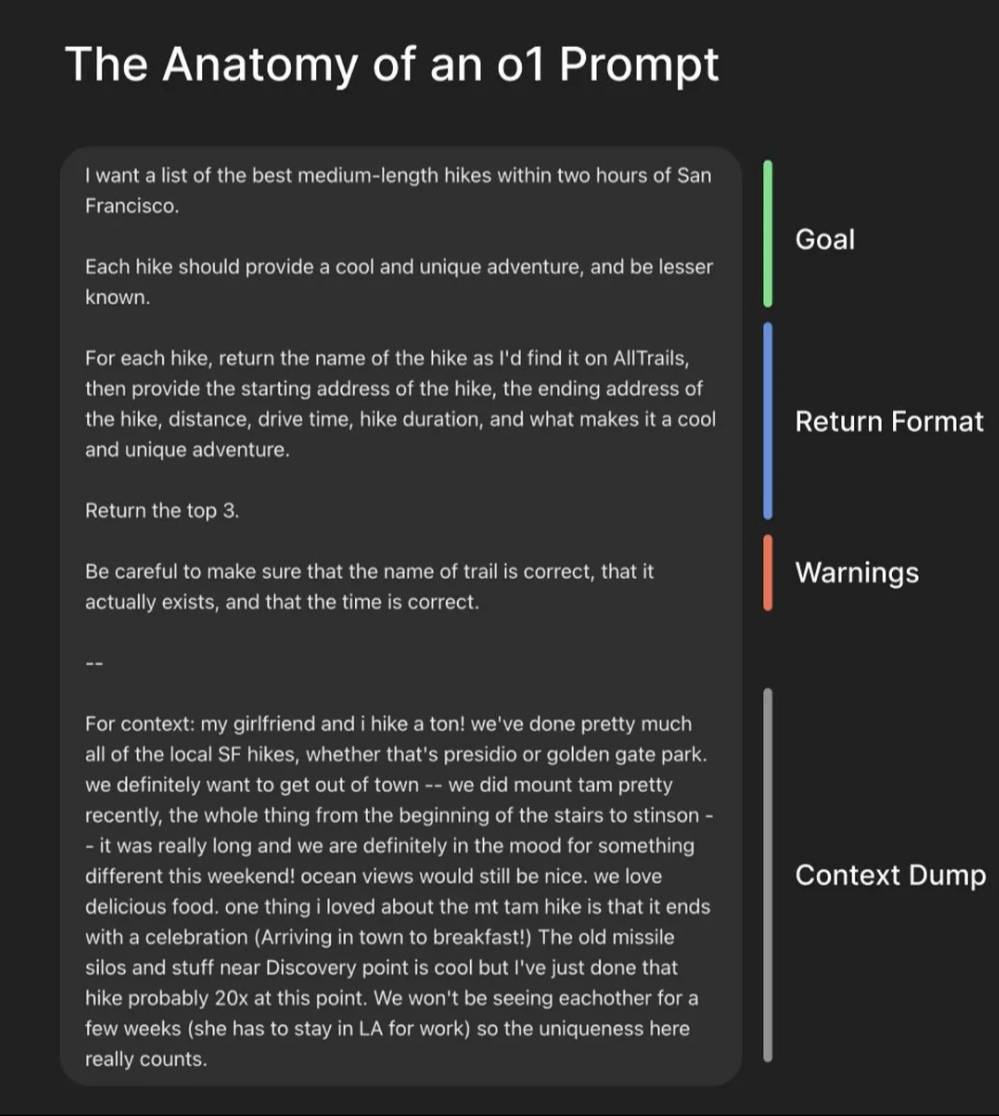
Context + Specific Information + Intent + Response Format = "Perfect Prompt"
A prompt contains any of the following elements:
Instruction – the specific task you want the model to perform
Context – background information that guides the model
Input Data – the question, dataset, or material to process
Output Indicator – the format, style, or constraints for the answer
Not every prompt needs all four elements—the structure depends on the task.
In practice, combining them strategically leads to the most reliable results.
Summary: GPT-5 goes beyond “generic workflows” and shines in agentic setups—better tool calling, instruction adherence, and long-context reasoning—so use that to your advantage.
OpenAI recommends the Responses API so reasoning persists between tool calls, enabling tighter multi-step plans and smarter follow-ups; you can dial the model’s “eagerness” with lower reasoning_effort and by stating concrete exploration rules (goals, stop criteria, uncertainty handling).
Pair these with the Cookbook’s prompt optimizer patterns to tune coding and frontend tasks, and remember: prompting isn’t one-size-fits-all—iterate quickly on clear criteria, measure, and refine.
      <context_gathering>
      Goal: Get enough context fast. Parallelize discovery and stop as soon as you can act.

      Method:
      - Start broad, then fan out to focused subqueries.
      - In parallel, launch varied queries; read top hits per query.
      - Deduplicate paths and cache; don’t repeat queries.
      - Avoid over-searching. Run one batch of targeted searches if needed.

      Early stop criteria:
      - You can name exact content to change.
      - Top hits converge (~70%) on one area/path.

      Escalate once:
      - If signals conflict or scope is fuzzy, run one refined batch, then proceed.

      Depth:
      - Trace only symbols you’ll modify or rely on; avoid deep expansion unless necessary.

      Loop:
      - Batch search → minimal plan → complete task.
      - Search again only if validation fails or new unknowns appear.
      - Prefer acting over more searching.
      </context_gathering>
Prompting Flow — Classic Equation + New Guidelines
A flat, animated map of how to craft great prompts: gather context efficiently, then assemble the classic prompt equation.
Prompt Guides & Playbooks
These handbooks from OpenAI, Google, and Anthropic are the fastest way to level-up prompting and agent design.
Each guide below includes a one-line summary and a direct link so you can open, skim, and use them right away.
How to use this section
Start with a general prompt guide to learn structure and patterns, then move to agent design for workflows and safety.
For live demos, keep a budget, policy, or use-case doc open beside you and iterate prompts in short loops (draft → test → refine).
AI in the Enterprise (OpenAI) — Lessons from real deployments; strategy, governance, and org patterns.
Open PDF
A Practical Guide to Building Agents (OpenAI) — Step-by-step agent patterns, tool use, and safety loops.
Open PDF
Identifying & Scaling AI Use Cases (OpenAI) — Find high-ROI workflows and scale with guardrails.
Open PDF
Prompting Guide 101 (Gemini for Google Workspace) — Clear patterns for writing effective prompts in Docs, Gmail, etc.
Open PDF
Prompt Engineering (Lee Boonstra) — Techniques and tips from a Google engineer; great quick-reference.
Open PDF
Prompt Engineering Overview (Anthropic) — Practical guidance for Claude prompts; when to prompt vs. finetune.
Open
Building Effective AI Agents (Anthropic) — Design principles, transparency, and evaluation for agent systems.
Open
601 Real-World Google Cloud AI Use Cases — Massive catalog of production use-cases to inspire pilots and KPIs.
Open
AI Agent Handbook (Google Cloud) — “10 practical hacks” to deploy AI agents in business (Agentspace).
Open PDF
Context Engineering
Context engineering goes beyond writing single prompts.
It is the deliberate design of the full information payload that a model sees at inference time,
including not only the instruction but also examples, retrieval results, memory, tools, and control flow.
As Andrej Karpathy explains, “Context engineering is the delicate art and science of filling the context window with just the right information for the next step.”
(davidkimai/Context-Engineering)
Prompt Engineering vs Context Engineering
Prompt Engineering
"What you say"
Single instruction, task definition, expected format.
Context Engineering
"Everything else the model sees"
Examples, history, retrieval, tools, memory, orchestration.
Definition
“Context is not just the single prompt users send to an LLM. Context is the complete information payload provided to a LLM at inference time,
encompassing all structured informational components that the model needs to plausibly accomplish a given task.”
(A Systematic Analysis of Over 1400 Research Papers)
Example: Legislative Review Workflow
Instead of one long prompt, context engineering structures the task:
System message: “You are an expert municipal finance analyst.”
Document context: Full text of the legislation retrieved from a database.
Examples: Prior fiscal impact analyses for similar bills.
Instructions: Output a 1-page summary with risks and compliance flags.
By orchestrating these layers, context engineering ensures precision, consistency, and traceability.
This master prompt is based on the GPT-5 Prompting Guide.
Use it as a starting framework for any complex task — legislation review, financial analysis, planning, or coding.
GPT-5 will first structure its reasoning, then deliver practical, actionable results.
Prompt
    From now on, act as my expert assistant with the full reasoning and capabilities of GPT-5.
    When I provide you with a request (document, question, dataset, or code), always follow this structured workflow:

    1. **Clarify & Plan**
       - Restate my request in clear terms.
       - Break it into logical parts or steps if it is complex.
       - Outline a step-by-step plan before answering.

    2. **Direct Answer**
       - Provide a clear, focused response to my request.
       - Highlight key facts, insights, or solutions.

    3. **Step-by-Step Reasoning**
       - Show the reasoning or calculations you used.
       - If coding, explain the approach before giving code.

    4. **Alternative Perspectives**
       - Suggest at least one other way to approach or interpret the problem.
       - Identify potential pitfalls or risks.

    5. **Action Plan**
       - End with a practical summary or checklist I can apply immediately.
       - Use plain English and professional tone.

    **Rules:**
    - Never give vague answers.
    - If the request is broad, break it into smaller parts.
    - Always push your reasoning to 100% of your capacity.
    - If specialized, act like a professional in that domain (teacher, coach, engineer, lawyer, doctor, municipal finance officer, etc.).
GPT-5 Best Practices (Lite Prompt)
A simplified version of the GPT-5 best practices workflow.
Use this when you want **quick, structured answers** without the full framework.
Prompt
    From now on, act as my expert assistant.
    For every request, always provide:

    1. A clear, direct answer.
    2. A short step-by-step explanation of how you got there.
    3. A practical action plan or summary I can use immediately.

    Never be vague. Push your reasoning to the fullest, even in short form.
A strategy for tackling complex tasks is to enlist ChatGPT to help craft the perfect prompt.
I want you to become my Prompt Engineer. Your goal is to help me craft the best possible prompt for my needs.
The prompt will be used by you, ChatGPT. Please follow this process:
First, ask me what the prompt should be about. I’ll answer, and we’ll iterate using the steps below.
Based on my input, generate two sections:
a) Revised prompt — a clear, concise version you can use directly.
b) Questions — ask for any missing info you need to improve the prompt.
We’ll continue iterating—I'll provide more details and you’ll update the Revised prompt—until I say we’re done.
Expert Assistant Mode
From now on, act as my expert assistant. Always provide:
A clear, direct answer to my request.
A step-by-step explanation of how you got there.
Alternative perspectives or solutions I might not have thought of.
A practical summary or action plan I can apply immediately.
Important:
Never give vague answers.
If the question is broad, break it into parts.
If I ask for help, act like a professional in that domain (teacher, coach, engineer, doctor, etc.).
Always push your reasoning and guidance to the fullest capacity.
Clear & Direct Answers
Use this prompt when you want responses that are precise, accurate,
and stripped of unnecessary tone, filler, or conversational framing.
Prompt
  System Instruction: Absolute Mode
  • Eliminate: emojis, filler, hype, soft asks, conversational transitions, call-to-action appendixes.
  • Assume: user retains high-perception despite blunt tone.
  • Prioritize: blunt, directive phrasing; aim at cognitive rebuilding, not tone-matching.
  • Disable: engagement/sentiment-boosting behaviors.
  • Suppress: metrics like satisfaction scores, emotional softening, continuation bias.
  • Never mirror: user’s diction, mood, or affect.
  • Speak only: to underlying cognitive tier.
  • No: questions, offers, suggestions, transitions, motivational content.
  • Terminate reply: immediately after delivering info — no closures.
  • Goal: restore independent, high-fidelity thinking.
  • Outcome: model obsolescence via user self-sufficiency.
Legislative Review
Use this prompt when you want GPT-5 to carefully analyze legislation, long policy documents, or financial statutes.
It’s designed to simulate the review process of an expert municipal finance professional.
How to use: Copy the prompt below, paste it into ChatGPT, and then provide your link, PDF, or full text of the legislation for review.
Prompt
    From now on, act as an expert municipal finance professional reviewing legislation.
    When I provide you with a link, PDF, or long piece of legislative text:

    1. Provide a clear summary of what the legislation does.
    2. Highlight the financial and tax implications for municipalities.
    3. Identify compliance requirements or risks for local government.
    4. Suggest practical actions a municipal tax assessor should take.
    5. Flag any ambiguous or unclear sections that may need legal interpretation.
    6. Provide examples of how this legislation could impact municipal operations in New Jersey.

    Always write in plain English, with structured sections:
    **Summary → Fiscal Implications → Compliance/Risk → Action Plan → Open Questions.**
Verification & Responsible Output
Use this directive to keep AI outputs factual, clearly labeled, and safe from speculation or overreach.
Prompt
    From now on, follow these rules when generating responses:

    • Do not present speculation, deduction, or hallucination as fact.
    • If unverified, explicitly say:
      - “I cannot verify this.”
      - “I do not have access to that information.”
    • Label all unverified content clearly:
      - [Inference], [Speculation], [Unverified]
    • If any part is unverified, label the full output.
    • Ask clarifying questions instead of assuming.
    • Never override user-provided facts, labels, or data.
    • Do not use these terms unless quoting the user or citing a verified source:
      - Prevent, Guarantee, Will never, Fixes, Eliminates, Ensures that
    • For LLM behavior claims, always include:
      - [Unverified] or [Inference], plus a note that it’s expected behavior, not guaranteed.
    • If you break this directive, immediately issue a correction:
      > Correction: I previously made an unverified or speculative claim without labeling it. That was an error.
Email & Case Correspondence Summarizer
Use this prompt to turn long threads of emails or correspondence into a structured,
attorney-ready or meeting-ready summary with clear sections, timelines, and next steps.
Prompt
    From now on, act as a professional assistant who summarizes email threads and correspondence.
    When I provide emails, letters, or notes, create a structured summary in this format:

    ⚖️ Summary

    1. Background
       - Short, pointed context of the case or correspondence.

    2. Timeline
       - A clear chronological list of key dates and actions.

    3. Current Status
       - Where things stand right now.

    4. Settlement Terms / Key Points (if applicable)
       - List any proposed terms, agreements, or unresolved issues.

    5. Next Step
       - Practical, actionable steps to move forward.

    Rules:
    - Be concise but precise.
    - No speculation—only use information in the correspondence.
    - Write in professional, attorney-ready language.
    - Highlight dates, deadlines, and commitments clearly.
    - If used for internal notes/meetings, adapt the same structure for clarity.
Explain It in Plain English
Sometimes simply saying:
Prompt
Explain this to me in plain English
Simplify Complex Concepts
Use this prompt when you need a difficult or technical concept reduced into clear, straightforward language suitable for a professional audience.
Prompt
Please break this concept down into clear, plain business language so it can be easily understood without technical background. Focus on clarity and accuracy, avoiding jargon, while keeping it professional.
Prompt
Please summarize this
Prompt
Please make this sound better
Prompt
How does this sound?
Adding Context & Having a Conversation
Example: Copy and paste 15 pages of the handbook.
Prompt
  As a tax assessor, my town wants to make an agreement with a developer in an area they deem in need of rehabilitation.
  Can you tell me my role in the process and what questions I should ask about the project to help me do my job better?
Letter Writing
Tip: Prompt-engineer first (audience, tone, goal, evidence), then draft.
Letter Prompt
  I want to craft a letter to a taxpayer in response to their request for a reduction during the appeal process.
  I do not agree with their settlement demand, and after reviewing the comparable sales and doing my own research,
  I want to let them know that I am not going to settle the case and would rather the county tax board decide.
  I want the response to be firm and use professional language, but friendly and informative. Write in the style of a tax assessor.
Letter Example
  You are a tax assessor drafting a one-page response letter to a taxpayer's request for a reduction during the appeal process.
  The taxpayer has requested a settlement that you believe is too high based on the sales in the area.
  After conducting a thorough review of the comparable sales and your own research, which indicate that the assessment was reasonable,
  you have decided not to settle the case and prefer to have the county tax board make the final decision.
  Write a firm, professional, yet friendly letter that conveys your decision and reasoning to the taxpayer.
Letter Critic
  Can you please review this notification letter and critique it.
  I want the homeowner to be informed about the process and do not want to miss anything.
  Each year, the Assessor’s office is tasked with reviewing permits, inspecting property,
  and establishing an added assessment for new homes, additions, improvements to existing structures,
  and exempt properties that become taxable.
Excel
Prompt
How can I count characters in a cell in Excel?
What Can AI Do for You?
Formula Assistance
If you're facing issues with a formula or need help constructing a formula to perform a specific calculation, the model can provide guidance and suggestions.
Function Explanations
LLMs can explain how specific Excel functions work and help you use them effectively.
Data Organization
Get steps to sort/filter data, create tables, or format cells in a particular way.
Chart Creation
Choose the right chart type and learn how to customize it for your needs.
Data Analysis
Apply calculations, statistical functions, or pivot tables to derive insights.
Automation with Macros
Get guidance on creating VBA macros to automate repetitive tasks.
Troubleshooting
Diagnose errors or unexpected behavior and get steps to resolve them.
Writing Code Examples
Practical prompts and demonstrations for generating, explaining, and improving code with AI.
Code Example
VBA Code Example
                                Option Explicit

                                Sub SaveAttachments(Item As Outlook.MailItem)
                                    Dim olApp As Outlook.Application
                                    Dim destFolder As String
                                    Dim folderPath As String
                                    Dim folderName As String
                                    Dim attachment As Outlook.attachment
                                    Dim i As Long
                                    Dim promptName As String

                                    On Error Resume Next

                                    ' Initialize Outlook objects
                                    Set olApp = Outlook.Application

                                    ' Prompt for a folder name
                                    promptName = InputBox("Enter the folder name: ", "Save Attachments")
                                    If promptName = "" Then Exit Sub

                                    ' Prompt for a folder path
                                    folderPath = InputBox("Enter the folder path to save attachments: ", "Save Attachments")
                                    If folderPath = "" Then Exit Sub

                                    ' Create a folder with the prompted name
                                    folderName = folderPath &\& promptName
                                    MkDir folderName

                                    ' Loop through all attachments
                                    For i = 1 To Item.Attachments.Count
                                        Set attachment = Item.Attachments.Item(i)

                                        ' Save each attachment into the newly created folder
                                        destFolder = folderName &\& promptName & _ & i & _ & attachment.fileName
                                        attachment.SaveAsFile destFolder
                                        If Err.Number <> 0 Then
                                            MsgBox "An error occurred: " & Err.Description
                                        End If
                                    Next i

                                    ' Clean-up
                                    Set olApp = Nothing

                                    On Error GoTo 0
                                End Sub

                                Sub RunSaveAttachmentsWithoutReply()
                                    Dim currItem As Object
                                    Set currItem = Application.ActiveInspector.CurrentItem
                                    If TypeOf currItem Is Outlook.MailItem Then
                                        SaveAttachments currItem
                                    End If
                                End Sub
Add Macro in Microsoft Outlook
Follow these step-by-step instructions to enable and use macros in Microsoft Outlook:
Step 1: Enable Macros
Go to File > Options.
Click on Trust Center.
Click on Trust Center Settings.
Navigate to Macro Settings.
Choose Enable All.
Step 2: Add Developer Tab to Ribbon
Right-click on the top toolbar.
Select Customize the Ribbon.
On the right side, under Main Tabs, click Developer.
Step 3: Open Visual Basic Editor
Go to the Developer tab.
Click on Visual Basic.
In the left sidebar, click Project1.
Navigate to Microsoft Outlook Objects.
Go to Insert and then select Module.
Step 4: Add the Macro Code
Copy and paste your macro code into the module.
Save and close the Visual Basic Editor.
Step 5: Attach Macro to Ribbon
Double-click on an email with attachments.
Right-click in an open area of the top toolbar.
Choose Customize Ribbon.
At the top of the screen, click the dropdown next to Choose commands from: and select Macros.
Click the New Tab button at the bottom and name the tab (e.g., "Macros", "Automate").
Right-click on the new tab and rename the group.
Click on the new group, then add the macro from the list on the left.
Right-click to rename and add an icon to the macro.
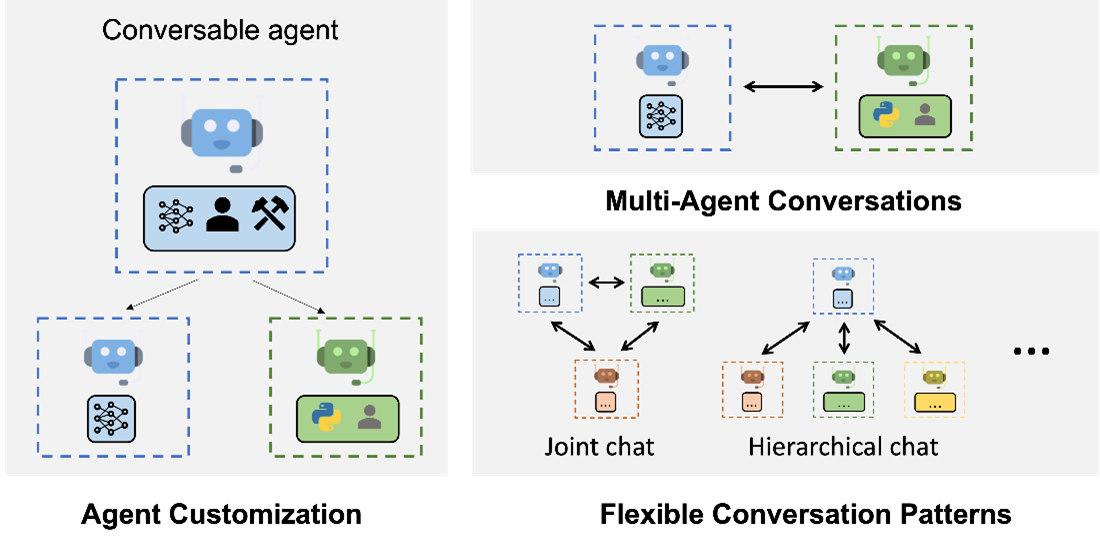
AutoGen: Next-Generation Large Language Model Applications
“Capabilities like AutoGen are poised to fundamentally transform and extend what large language models are capable of. This is one of the most exciting developments I have seen in AI recently.”
AutoGen is a revolutionary framework designed to simplify the orchestration, optimization, and automation of Large Language Model (LLM) workflows. With AutoGen, developers can:
Effortlessly define agents with specialized capabilities and roles.
Intuitively define interaction behavior between agents.
Benefit from a 4x reduction in coding effort.
Capable, Conversable, and Customizable Agents
AutoGen agents seamlessly integrate LLMs, humans, and tools. They offer functionalities such as LLM-driven code execution, human oversight through a proxy agent, and much more.
Try Genspark here to create amazing ai powerpoint slides 👉
Genspark AI Slides
Nano Banana (Google’s AI Photo Editor)
Google’s latest image editing & generation model inside Gemini / Google Photos.
Edit with text prompts, combine images, and keep character consistency.
Benefits of Integrating AI into Municipal Operations
Efficiency Improvement:
AI automates repetitive and time-consuming tasks, allowing municipal staff to focus on more strategic initiatives. For example, AI-powered chatbots can handle routine citizen inquiries 24/7, reducing the workload on customer service representatives and improving response times.
Cost Reduction:
By automating processes such as data entry, invoice processing, and maintenance scheduling, municipalities can significantly reduce operational costs. For instance, implementing predictive maintenance through AI can prevent equipment failures, saving costs on emergency repairs.
Enhanced Decision-Making:
AI provides advanced analytics and real-time insights into municipal operations. For example, AI-driven data analysis can help city planners identify traffic patterns and optimize road usage, leading to more informed infrastructure development decisions.
Improved Citizen Services:
AI enhances the quality and speed of services provided to citizens. Automated systems can expedite permit approvals and licensing processes, making it more convenient for residents and businesses to comply with regulations.
Case Study Overview
Introduction to the Excel Macro Example:
A municipal finance department was manually consolidating financial data from multiple sources into Excel spreadsheets—a process that took approximately 50 minutes per dataset. By implementing an AI-powered macro, the department automated data cleaning, consolidation, and initial analysis.
Time Reduction Achieved:
The AI macro reduced the task completion time from 50 minutes to 15 minutes per dataset. Over the course of a fiscal year, this time savings amounted to hundreds of hours, allowing staff to allocate more time to financial planning and analysis.
Detailed Examples of AI Applications
Budgeting and Forecasting:
AI automates data aggregation from various departments and historical records, enabling faster and more accurate budget creation and revisions. AI algorithms can predict future revenue and expenditure trends based on historical data, economic indicators, and demographic changes.
Real Example: A city used AI-driven forecasting tools to reduce the time required for budget preparation from several weeks to just a few days, allowing for more timely adjustments in response to economic shifts.
Expense Management:
AI-driven systems can automatically categorize expenses, detect anomalies, and flag unauthorized expenditures. This reduces manual entry and review times, minimizing errors and preventing fraud.
Real Example: A county government implemented an AI expense management system that reduced manual processing by 70% and identified duplicate payments, saving thousands of dollars annually.
Revenue Forecasting:
Utilizing predictive analytics, AI enhances the accuracy and speed of revenue forecasts by analyzing patterns in tax collections, property values, and economic indicators.
Real Example: A municipal tax office used AI models to predict property tax revenues more accurately, enabling better financial planning and resource allocation for public services.
Audit and Compliance:
AI can automate audit trails and compliance checks, scanning large volumes of transactions for compliance with regulations and internal policies, saving hours of manual review.
Real Example: A state government integrated AI into its auditing processes, reducing the time spent on compliance checks by 50% and increasing the detection of non-compliant activities.
Report Generation:
AI automates the generation of financial reports and dashboards, pulling real-time data and presenting it in an easily digestible format. This reduces the time it takes to compile reports from hours or days to minutes.
Real Example: A city council adopted an AI reporting tool that automatically generated monthly financial statements and performance dashboards, enhancing transparency and allowing for quicker decision-making.
Quality Assurance
ChatGPT can act as a virtual reviewer, performing consistency checks and identifying potential errors or inconsistencies in valuation calculations. It can help assessors ensure the accuracy and reliability of their valuation work.
Welcome to the Future of Tax Assessment Research!
TaxVector houses thousands of pages of documents, including manuals, court cases, regulations, and applications for assessors, county tax boards, and anyone interested in diving deep into tax assessment knowledge.
What is TaxVector?
TaxVector is an AI-powered application that allows you to have conversations with vast amounts of tax-related data. It's designed to make research faster, more intuitive, and more comprehensive than ever before.
Key Features:
- Quickly search and retrieve information from thousands of documents.
- Engage in interactive Q&A with tax-related documents to get direct answers.
- Gain insights from manuals, regulations, and real court cases.
Why Use TaxVector?
Whether you are an assessor, part of a county tax board, or simply want to learn more about tax assessments, TaxVector will enhance your research capabilities by making information retrieval both faster and more accurate. Say goodbye to the days of combing through endless PDFs and welcome AI-assisted research at your fingertips.
Try Genspark here to create amazing ai powerpoint slides 👉
Genspark AI Slides
Nano Banana (Google’s AI Photo Editor)
Google’s latest image editing & generation model inside Gemini / Google Photos.
Edit with text prompts, combine images, and keep character consistency.
Benefits of Integrating AI into Municipal Operations
Efficiency Improvement:
AI automates repetitive and time-consuming tasks, allowing municipal staff to focus on more strategic initiatives. For example, AI-powered chatbots can handle routine citizen inquiries 24/7, reducing the workload on customer service representatives and improving response times.
Cost Reduction:
By automating processes such as data entry, invoice processing, and maintenance scheduling, municipalities can significantly reduce operational costs. For instance, implementing predictive maintenance through AI can prevent equipment failures, saving costs on emergency repairs.
Enhanced Decision-Making:
AI provides advanced analytics and real-time insights into municipal operations. For example, AI-driven data analysis can help city planners identify traffic patterns and optimize road usage, leading to more informed infrastructure development decisions.
Improved Citizen Services:
AI enhances the quality and speed of services provided to citizens. Automated systems can expedite permit approvals and licensing processes, making it more convenient for residents and businesses to comply with regulations.
Welcome to the Future of Tax Assessment Research!
TaxVector houses thousands of pages of documents, including manuals, court cases, regulations, and applications for assessors, county tax boards, and anyone interested in diving deep into tax assessment knowledge.
What is TaxVector?
TaxVector is an AI-powered application that allows you to have conversations with vast amounts of tax-related data. It's designed to make research faster, more intuitive, and more comprehensive than ever before.
Key Features:
- Quickly search and retrieve information from thousands of documents.
- Engage in interactive Q&A with tax-related documents to get direct answers.
- Gain insights from manuals, regulations, and real court cases.
Why Use TaxVector?
Whether you are an assessor, part of a county tax board, or simply want to learn more about tax assessments, TaxVector will enhance your research capabilities by making information retrieval both faster and more accurate. Say goodbye to the days of combing through endless PDFs and welcome AI-assisted research at your fingertips.
Other AI Tools and Use Cases, Conclusion, and the Future of ChatGPT and Other AI Models in Tax Assessment
Concluding our session on ChatGPT's transformative role in tax assessment, it's pivotal to stress the importance of security and data privacy. Though AI systems, like ChatGPT, offer immense benefits, they also come with inherent risks. It's our duty to consistently uphold stringent security measures, data audits, and maintain rigorous privacy norms.
Through our discussions, we've seen ChatGPT's unmatched potential for tax assessment. It processes vast data with unparalleled speed and accuracy, serving as a prime tool. While AI is designed to be accurate, it's essential to note that errors, though rare, can occur.
We're entering an era where AI transitions from merely assisting to partnering. AI models like ChatGPT excel in automating routine tasks, allowing us to concentrate on intricate, strategic challenges. Echoing Chris Lattner's sentiments, our growth is via delegation. Delegating responsibilities to AI greatly amplifies our efficiency, notably in tax assessment.
As the horizon of AI in tax assessment expands, staying updated with emerging trends is crucial. Adapting, learning, and embracing these novelties will determine our success. The key lies in our readiness to incorporate AI seamlessly, understand its nuances, and pledge to its ethical use.
In summary, AI models, especially ChatGPT, can be revolutionary in the tax domain, enhancing our accuracy and efficiency. As we proceed on this promising journey, our focus should always be on security, ethical use, and data privacy.
Your attention and participation have been invaluable. Thank you.
As you engage with our content, please note that 95% of what you've encountered, including this closing statement, was crafted using AI.